Snipe-IT » History » Revision 2
« Previous |
Revision 2/4
(diff)
| Next »
Redmine Admin, 10/26/2026 02:24 AM
deploy-publish.sh
Deployed by ~/deploy/snipeit-install.sh [domain] [--force] [--skip-npm-api] (same
pattern as add-wordpress-site.sh; restarts NPM at step 6).
Containers site-snipeit (docker.io/snipe/snipe-it, Apache :80) +
db-snipeit (mariadb:11) on net-snipeit. Data volume app-snipeit-data
at /var/lib/snipeit (uploads, backups, OAuth keys) — app code is in the
image. Secrets: snipeit-db-root-password, snipeit-db-password,
snipeit-app-key.
Key env (behind NPM): APP_URL=https://assets.mdsdefense.com,
APP_FORCE_TLS=true, APP_TRUSTED_PROXIES=*, SECURE_COOKIES=true,
DB_HOST=db-snipeit, APP_KEY from secret. APP_KEY must never change
— it encrypts fields in the DB; back the secret up with the DB.
# generate APP_KEY once (before first start)
podman run --rm docker.io/snipe/snipe-it:latest php artisan key:generate --show
printf '%s' 'base64:...' | podman secret create snipeit-app-key -

# first start runs migrations; watch it
podman logs -f site-snipeit

# artisan inside the container
podman exec -it site-snipeit php artisan about
podman exec -it site-snipeit php artisan snipeit:backup
podman exec -it site-snipeit php artisan config:clear   # after env changes + restart

# DB (same MariaDB recipe as WordPress)
podman exec -it db-snipeit sh -c 'mariadb -uroot -p"$MYSQL_ROOT_PASSWORD"'
podman exec db-snipeit sh -c 'mariadb-dump -uroot -p"$MYSQL_ROOT_PASSWORD" snipeit' > ~/tmp/snipeit-$(date +%F).sql
First-run pre-flight (Configuration Check)
Screenshot (2026-10-25, Snipe-IT v8.8.3):
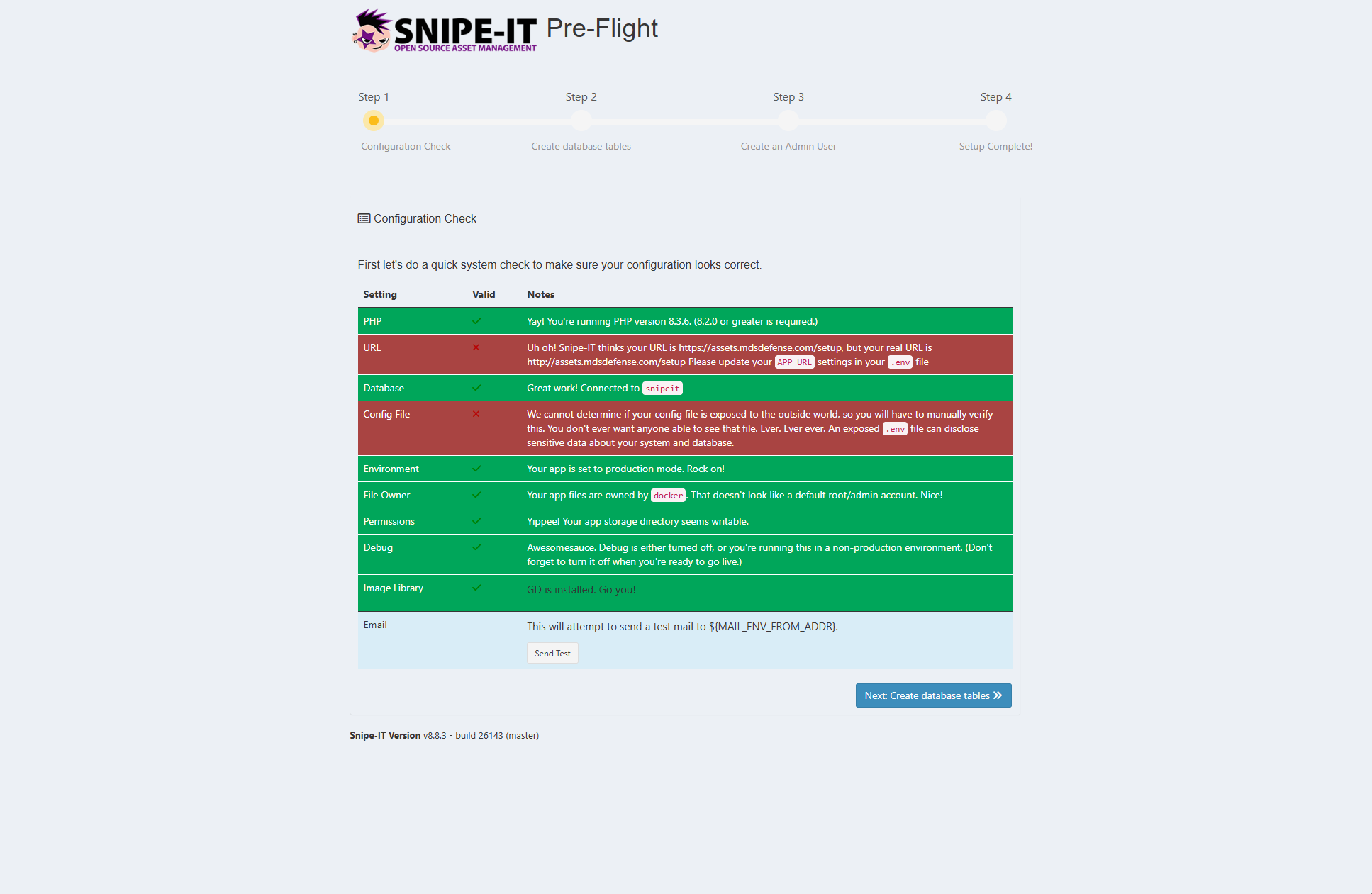
Behind NPM the check shows two red rows that are expected and can be ignored;
"Next: Create database tables" stays enabled:
| Row | What it says | Why it is red here | Verdict | How it was verified |
|---|---|---|---|---|
| URL | "thinks your URL is https://… but your real URL is http://…" | NPM owns 443 and terminates TLS; it talks plain HTTP to site-snipeit:80, so the app sees http. APP_URL=https://assets.mdsdefense.com in the unit is correct. There is no .env to edit — config is the unit's Environment= lines. |
Normal behind a TLS-terminating proxy — ignore | After setup: login works without a redirect loop and every link/redirect is https://. Header test below. |
| Config File | "cannot determine if your config file is exposed" | The check can't probe from outside. In the image .env is outside Apache's document root (public/). |
ignore |
/.env returns 403 through NPM (command below). |
| test button | MAIL_MAILER=log |
skip until the SMTP relay is on — but the From address must be valid even now (see Mail) | — |
Verification commands (websvcmaster):
# Config File: .env must not be served -> 403/404
curl -sI --resolve assets.mdsdefense.com:444:127.0.0.1 https://assets.mdsdefense.com:444/.env | head -1

# URL: the app must build https redirects when NPM's forwarded header is present
podman exec site-snipeit sh -c 'curl -sI -H "X-Forwarded-Proto: https" -H "Host: assets.mdsdefense.com" http://127.0.0.1/ | grep -i ^location'
#   https://assets.mdsdefense.com/...  -> OK
#   http://...                          -> APP_TRUSTED_PROXIES not honoured: set it to the
#                                          net-snipeit subnet (podman network inspect net-snipeit | jq -r '.[0].subnets[0].subnet'),
#                                          cp unit, daemon-reload, restart
# If OK here but the browser still gets http links: NPM isn't sending the header ->
#   proxy host -> Advanced -> proxy_set_header X-Forwarded-Proto https;

# Overall: 302 to /login (or /setup before setup) is the healthy answer
check-sites.sh | grep snipeit
Mail (SMTP relay)
Same Exchange Online IP connector as Redmine — no credentials. From and Reply-To
must always be set to real addresses, even while the mailer is log. The image's
default is the unresolved placeholder ${MAIL_ENV_FROM_ADDR}, which is not a valid
address, so Snipe-IT answers HTTP 500 whenever it builds any email (creating a user,
the Test Email button, a password reset) — whatever the mailer. Found 2026-10-25:
500 while creating the first admin; the user was saved, only the email step failed.
The setup form pre-fills the same placeholder in its address field and rejects it (no @);
typing a real address there fixes the form only — the From used when a mail is sent still
comes from the environment variable, so the 500 stays until the unit is fixed.
snipeit-install.sh v1.1 writes the unit like this (v1.0 had the From lines commented out):
Environment=MAIL_FROM_ADDR=sysadmin@mdsdefense.com
Environment=MAIL_FROM_NAME=Snipe-IT
Environment=MAIL_REPLYTO_ADDR=sysadmin@mdsdefense.com
Environment=MAIL_REPLYTO_NAME=Snipe-IT
Environment=MAIL_MAILER=log
#Environment=MAIL_MAILER=smtp
#Environment=MAIL_HOST=mdsdefense-com.mail.protection.outlook.com
#Environment=MAIL_PORT=25
#Environment=MAIL_ENCRYPTION=tls
To fix a unit generated by v1.0 and switch SMTP on in one go (repo copy, websvcmaster;
for a v1.1 unit drop the last two -e lines, they would duplicate Reply-To):
cd ~/deploy
sed -i -e '/^Environment=MAIL_MAILER=log$/d' \
       -e 's/^#\(Environment=MAIL_\)/\1/' \
       -e 's/<tenant>\.mail\.protection\.outlook\.com/mdsdefense-com.mail.protection.outlook.com/' \
       -e '/^Environment=MAIL_FROM_NAME=/a Environment=MAIL_REPLYTO_ADDR=sysadmin@mdsdefense.com' \
       -e '/^Environment=MAIL_FROM_NAME=/a Environment=MAIL_REPLYTO_NAME=Snipe-IT' \
       quadlet/site-snipeit.container
grep -n MAIL quadlet/site-snipeit.container      # eight active MAIL_ lines (MAILER, HOST, PORT, ENCRYPTION, FROM x2, REPLYTO x2), no =log
Commit (root: deploy-commit.sh -m "snipeit: From/Reply-To + SMTP via Exchange Online IP connector"),
then go live — restarts only site-snipeit (a few seconds, other sites untouched):
cp ~/deploy/quadlet/site-snipeit.container ~/.config/containers/systemd/
systemctl --user daemon-reload && systemctl --user restart site-snipeit.service
podman exec site-snipeit printenv | grep ^MAIL_
Testing mail. GUI: Admin Settings → General Settings → Test Email (not under
Notifications). Command line alternative, with the actual SMTP error printed (websvcmaster;
it only sends a single message, nothing is changed). Use an @mdsdefense.com recipient:
podman exec site-snipeit php artisan tinker --execute='Mail::raw("Snipe-IT SMTP test", fn($m) => $m->to("sysadmin@mdsdefense.com")->subject("Snipe-IT test")); echo "sent\n";'
sent plus the mail in the mailbox = relay works. Another end-to-end check: log out →
Forgot password; that form asks for the username, not the e-mail address, and shows
"sent" even for an unknown username, so a wrong entry silently sends nothing. If the TLS handshake fails, set
MAIL_ENCRYPTION= (empty) and restart.
Result 2026-10-26: mail to an @mdsdefense.com mailbox is delivered (Redmine, which uses the
same connector, delivers too). The same test to an external address (gmail.com) is refused by
Exchange Online: 451 4.4.4 Mail received as unauthenticated, incoming to a recipient domain configured in a hosted tenant which has no mail-enabled subscriptions. ATTR5. TLS and
From/Reply-To are fine and the connector does recognise the host's IP (internal mail passes);
the refusal is on Exchange's side for non-tenant recipients. Cause not yet established — check
the connector in the Exchange admin center (type "Your organization's email server", status
On, and whether relay to external recipients is permitted) and use Mail flow → Message trace
for the failing attempt. Until then Snipe-IT can notify @mdsdefense.com addresses only.
Image versions and upgrades
Pinned state (2026-10-26, commit 4a9a464): site-snipeit runs
docker.io/snipe/snipe-it:v8.8.3 (build 26143-g80b2dc5768, same build that latest was at install);
db-snipeit runs MariaDB 11.8.9 pinned by digest (mariadb@sha256:2439dcd7…, the image that was
running — the 11.8 tag had already moved to a different image). snipeit-install.sh v1.1 still
defaults to :latest; for a new install pass --app-image docker.io/snipe/snipe-it:v8.8.3.
Why pinned: latest does not update by itself (podman does not re-pull an image that exists
locally), but it silently moves whenever the image is pulled or the container is recreated, and
Snipe-IT runs database migrations at start — an unplanned version jump changes the schema. With a
pin, the version in use is in the unit file and in git, and an upgrade is a deliberate edit.
There is no upgrade from the GUI. Snipe-IT shows a "new version available" notice (it checks
GitHub), but the code lives in the image; the only way to upgrade is to replace the image.
Anything changed inside the container is lost when the image changes.
Upgrade procedure (websvcmaster unless stated):
- New release noticed (GUI notice, or the
snipe/snipe-ittags on Docker Hub): note the tag, e.g.v8.8.4. Tags arev<major>.<minor>.<patch>;-alpinevariants exist, the unit uses the non-alpine one. -
Backup first: DB dump, the
app-snipeit-datavolume, thesnipeit-app-keysecret (the migration at step 5 cannot be undone without the dump). - Change one line in the repo copy:
Image=docker.io/snipe/snipe-it:v8.8.4. - Commit (root:
deploy-commit.sh -m "snipeit: upgrade to v8.8.4"), thencpthe unit to~/.config/containers/systemd/,systemctl --user daemon-reload,systemctl --user restart site-snipeit.service. Only Snipe-IT is down for a few seconds. - Migrations run on start:
podman logs -f site-snipeit, then~/deploy/check-sites.sh(expect 302 for assets), then log in and check Admin → System information for the version. - If it breaks: put the old
Image=line back, restart; if the schema already changed, restore the DB dump.
MariaDB patch updates are the same idea: change the digest (or the 11.8 tag) on purpose, with a dump
taken first. Rules for unit files: a comment must be on its own line — Image=… # note makes the
comment part of the image name. Read the running digest with
podman image inspect <image-id> --format '{{.Digest}}'.
Source: dmz-web-podman-cheatsheet.md v1.4.1 in the dmz-web-deploy repo (Releases). Edit the wiki and the repo copy together.
Updated by Redmine Admin 11 days ago · 4 revisions